


Table of Contents

Table of Contents

HireFive logo.

HireFive

Streamline Your Job Search.

A laptop displaying the HireFive job board interface, showcasing search filters, a list of active job listings, and an open job description for a UI/UX Designer role.
HireFive logo.

HireFive

Streamline Your Job Search.

A laptop displaying the HireFive job board interface, showcasing search filters, a list of active job listings, and an open job description for a UI/UX Designer role.
HireFive logo.

HireFive

Streamline Your Job Search.

A laptop displaying the HireFive job board interface, showcasing search filters, a list of active job listings, and an open job description for a UI/UX Designer role.
HireFive logo.

HireFive

Streamline Your Job Search.

A laptop displaying the HireFive job board interface, showcasing search filters, a list of active job listings, and an open job description for a UI/UX Designer role.

Overview

The modern job search often involves applying to multiple roles across different websites and tailoring resumes, which makes it hard for job seekers to track and manage application materials and statuses.

HireFive is a job search platform that streamlines the application process by enabling users to apply for jobs, manage application materials, optimize resumes, and track interviews in a centralized system.

Duration

January 2026 - August 2026

My Role

  • Product Designer

  • UX Researcher

  • UI/UX Designer

Tools

  • Figma

  • FigJam

  • Qualtrics

  • Miro

Process

1. Research

  • User interviews

  • Surveys

  • Persona

  • User Journey Map

  • Comparative Analysis

2. Design

  • User Flow Diagram

  • Low-Fidelity Wireframes

  • Design System

  • High-Fidelity Prototype

3. Refine

  • Usability Testing

  • Design Iterations

4. Final

  • Key Features

  • Impact

  • Next Steps

1. Research

User Interviews

To uncover why the modern job search feels chaotic, I conducted semi-structured user interviews evaluating how job seekers navigate fragmented workflows, application organization, and platform fatigue.

Synthesizing the qualitative data through thematic mapping, I discovered the following three systemic friction points impacting job seekers.

Tool Disconnection

Standard job boards lack native management tools, forcing users to manually fragment their data across external tools like Google Sheets.

Resume Screening Blindspot

Job seekers apply blindly without knowing if their resume format or keywords will pass automated Applicant Tracking Systems (ATS).

Untracked Timelines

Standard job boards lack integrated tracking tools and automated interview reminders, leaving users prone to missing critical dates.

Survey

To analyze behavioral patterns across a broader population of the target audience, I distributed a quantitative survey via Qualtrics. While the data validated the three interview friction points, it also revealed a distinct behavioral pattern regarding file management.

Document Fragmentation

72% of participants rely on digital folders to manually store their job materials, but over 90% of them fail to track the documents they submit for each application.

Insight & Opportunity:

Most job seekers prefer using folders to manage materials, but manually switching tools makes it hard for them to keep track of their documents. Thus, HireFive should automatically create a folder for each application users submit within the platform.

Persona

Based on the behavioral patterns uncovered in research, I synthesized my findings into a primary persona: Tiffany, a Product Manager navigating a highly fragmented full-time job hunt. This persona served as the North Star throughout the entire design process, ensuring every feature directly solves real user frustrations.

Headshot of Tiffany, a smiling young professional woman working on a laptop in a cafe.

Tiffany

29 years old

Irvine, CA

Headshot of Tiffany, a smiling young professional woman working on a laptop in a cafe.

Tiffany

29 years old

Irvine, CA

Headshot of Tiffany, a smiling young professional woman working on a laptop in a cafe.

Tiffany

29 years old

Irvine, CA

Headshot of Tiffany, a smiling young professional woman working on a laptop in a cafe.

Tiffany

29 years old

Irvine, CA

Biography

Biography

As an active Product Manager, Tiffany cross-references multiple job boards to find job opportunities. However, navigating fragmented platforms makes it incredibly difficult to manage disparate tracking materials, application statuses, and interviews.

As an active Product Manager, Tiffany cross-references multiple job boards to find job opportunities. However, navigating fragmented platforms makes it incredibly difficult to manage disparate tracking materials, application statuses, and interviews.

Frustrations

  • Overwhelmed by the large number of disorganized documents.

  • Uncertain how to optimize resumes for ATS screeners.

  • Prone to losing track of upcoming interview dates across multiple tools.

Goal

  • Streamline her application workflow inside a single platform that integrates document management, resume enhancement, and timeline tracking.

User Journey Map

Using the persona, I outlined four key phases of the user experience. From there, I developed a journey map to visualize the user's behaviors across these phases and identify critical design opportunities.

1. Optimize Resume

1a.

View and select a desired job posting.

1b.

Tailor the resume to match the job.

Opportunity

Integrate a resume checker to help users strengthen their resumes.

2. Submit Application

2a.

Fill out the job application form.

2b.

Review and submit the application form.

Opportunity

Auto-save users' inputs to reduce repetitive data entry in future submissions.

3. Manage Application

3a.

Open the job application folder.

3b.

Manage the relevant job documents.

Opportunity

Build a folder-based document repository to let users organize job materials.

4. Track Application

4a.

Enter the upcoming interview details.

4b.

Update and track the job status.

Opportunity

Design a calendar system to help users check all interview details.

1. Optimize Resume

1a.

View and select a desired job posting.

1b.

Tailor the resume to match the job.

Opportunity

Integrate a resume checker to help users strengthen their resumes.

2. Submit Application

2a.

Fill out the job application form.

2b.

Review and submit the application form.

Opportunity

Auto-save users' inputs to reduce repetitive data entry in future submissions.

3. Manage Application

3a.

Open the job application folder.

3b.

Manage the relevant job documents.

Opportunity

Build a folder-based document repository to let users organize job materials.

4. Track Application

4a.

Enter the upcoming interview details.

4b.

Update and track the job status.

Opportunity

Design a calendar system to help users check all interview details.

Comparative Analysis

To assess how the market currently handles application workflows and make the application more competitive, I conducted a comparative audit to evaluate the strengths and weaknesses of the platforms that share similar features: Indeed, Teal, and Jobscan.

2. Design

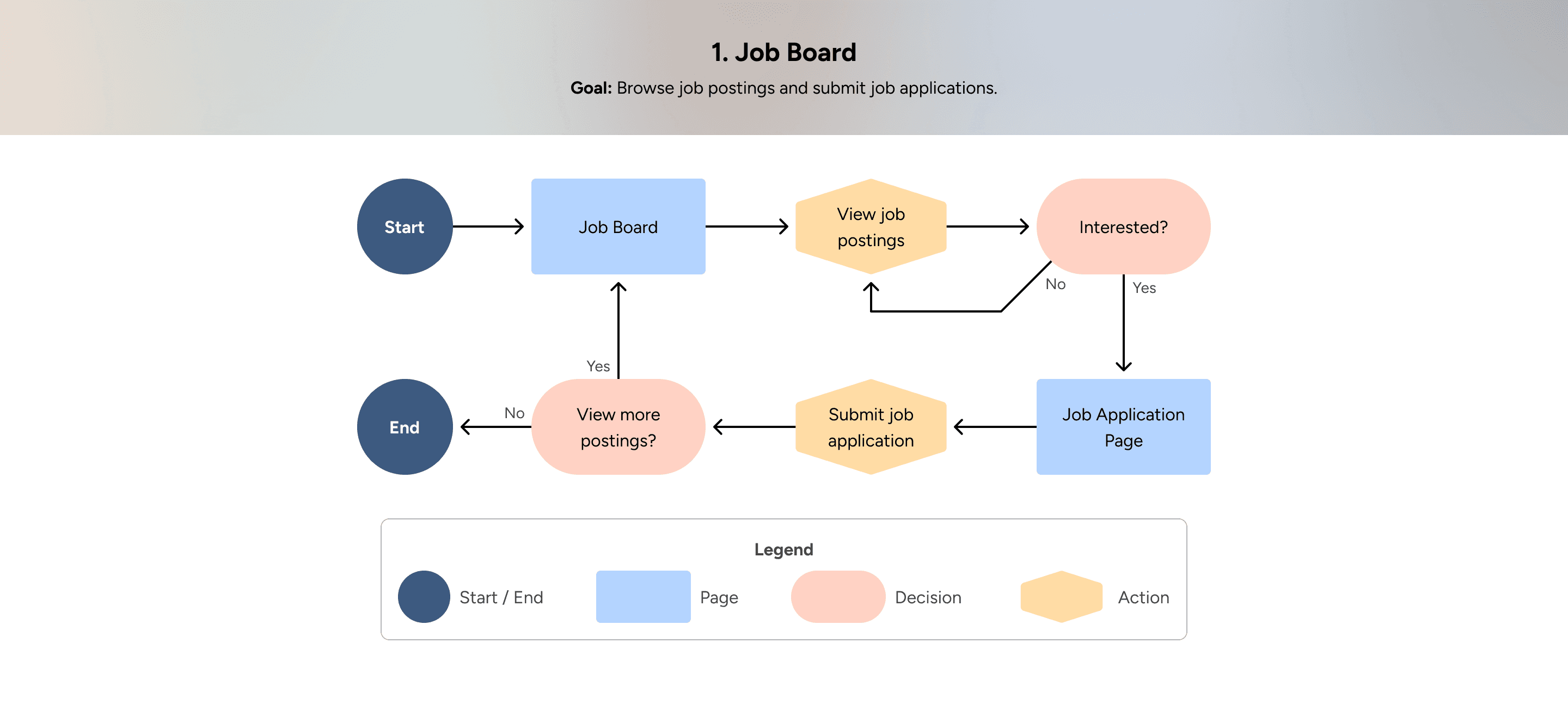
User Flow Diagrams

Synthesizing my research, I translated user needs into four key modules: a Job Board, Job Tracker, Resume Checker, and Calendar. I then mapped out a user flow diagram for each to establish an intuitive ecosystem architecture.
Low-Fidelity Wireframes

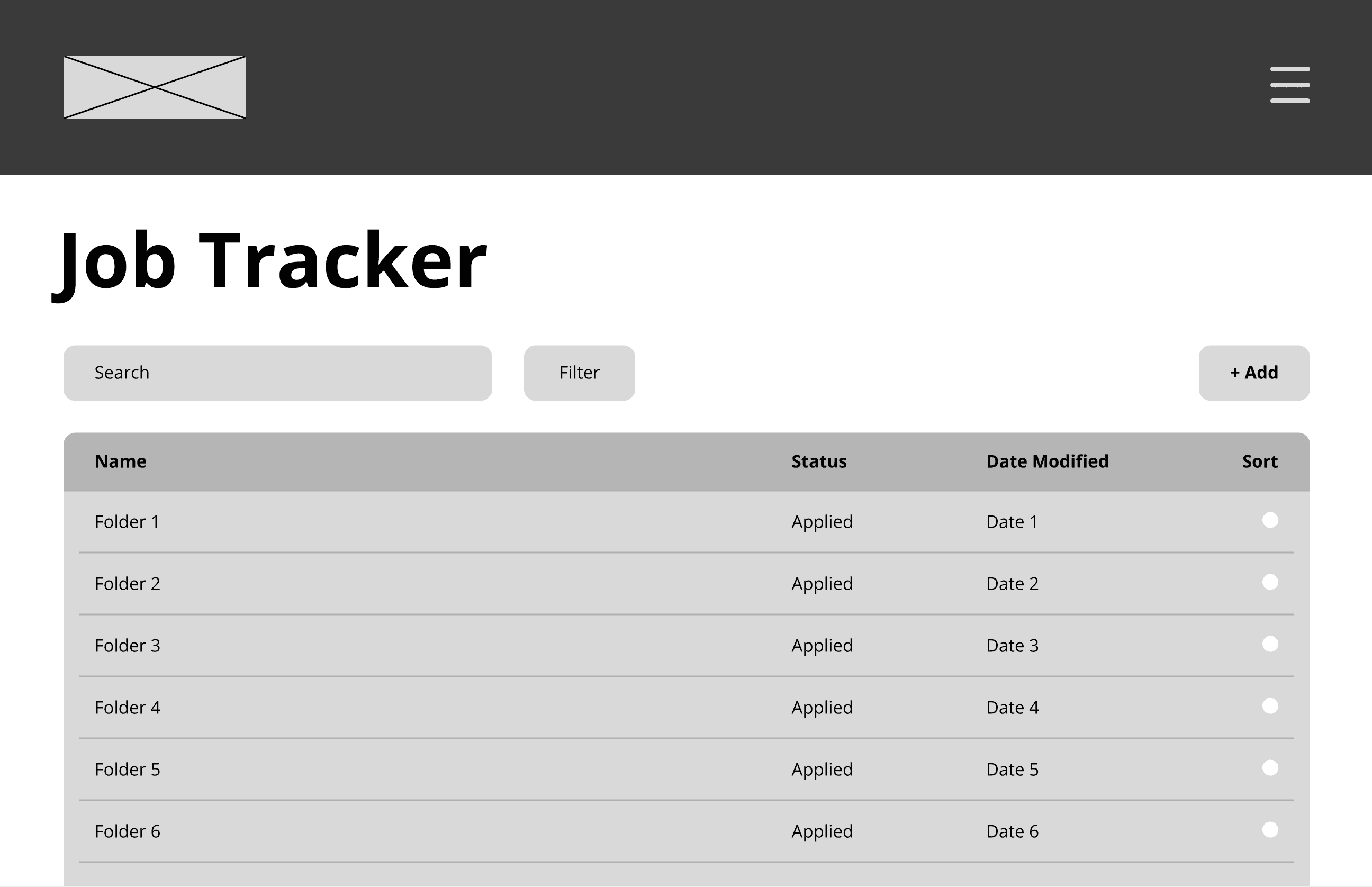
Using Figma, I translated user flows into low-fidelity wireframes, focusing strictly on information architecture, visual hierarchy, and spatial layout without the distraction of aesthetic styling.

Because users primarily access HireFive on desktop during focused work sessions, maximizing data clarity was critical. I implemented a split-screen layout for the Job Board, structured folders for the Job Tracker and Resume Evaluation Report, and a grid-based system for the Calendar to ensure instantaneous asset retrieval.

Wireframe of the Job Board interface, showing a split-screen layout with a left sidebar list of available jobs and a main right panel displaying details for Job 1.
Wireframe of the Resume Checker dashboard, displaying a prominent circular graphic showing a one-hundred percent ATS Score next to a multi-tab analysis panel for layout and format readability.
Wireframe of the Job Tracker interface, featuring a structured data table that lists folders with columns for status, date modified, and sorting options.
Wireframe of the Calendar interface, displaying a clean grid layout for a full monthly view with date boxes and an event scheduled on the seventh day.
Wireframe of the Job Board interface, showing a split-screen layout with a left sidebar list of available jobs and a main right panel displaying details for Job 1.
Wireframe of the Job Tracker interface, featuring a structured data table that lists folders with columns for status, date modified, and sorting options.
Wireframe of the Resume Checker dashboard, displaying a prominent circular graphic showing a one-hundred percent ATS Score next to a multi-tab analysis panel for layout and format readability.
Wireframe of the Calendar interface, displaying a clean grid layout for a full monthly view with date boxes and an event scheduled on the seventh day.

Design System

To scale HireFive efficiently, I established a foundational design system to ensure absolute visual and behavioral consistency across 10+ unique platform views. Standardizing strict guidelines for color tokens, typographic hierarchies, and reusable interactive components drastically reduces user cognitive load while accelerating front-end deployment.

(Curated snapshot. Comprehensive design system includes complete styles and component variants.)

Colors

Colors

Primary

900

#09181D

700

#1A4857

500

#2B7891

300

#80AEBD

100

#D5E4E9

Secondary

900

#321D0A

700

#95571D

500

#F99131

300

#FBBD83

100

#FEE9D6

Typography

Typography

Heading 1

Heading 1

Aa

Aa

Font: Open Sans

Font: Open Sans

Weight: Bold

Weight: Bold

Size: 56px

Size: 56px

Heading 2

Heading 2

Aa

Aa

Font: Open Sans

Font: Open Sans

Weight: Bold

Weight: Bold

Size: 40px

Size: 40px

Heading 3

Heading 3

Aa

Aa

Font: Open Sans

Font: Open Sans

Weight: Bold

Weight: Bold

Size: 32px

Size: 32px

Body 1

Body 1

Aa

Aa

Font: Open Sans

Font: Open Sans

Weight: Regular

Weight: Regular

Size: 24px

Size: 24px

Caption

Caption

Aa

Aa

Font: Open Sans

Font: Open Sans

Weight: Regular

Weight: Regular

Size: 16px

Size: 16px

UI Elements

UI Elements

Buttons (5 states)

A row of interactive button components showcasing five design states: Default, Hover, Active, Focus with a thick outline, and a faded Disabled state.
Two rows of interactive button components showcasing five design states: Default, Hover, Active, Focus with a thick outline, and a faded Disabled state.

Input (6 states)

A grid of text input fields showcasing six design states for a First Name form field: Default, Hover, Active, Focus with a bold border, Success with a green checkmark, and Error with a red border and helper message.

High-Fidelity Prototype

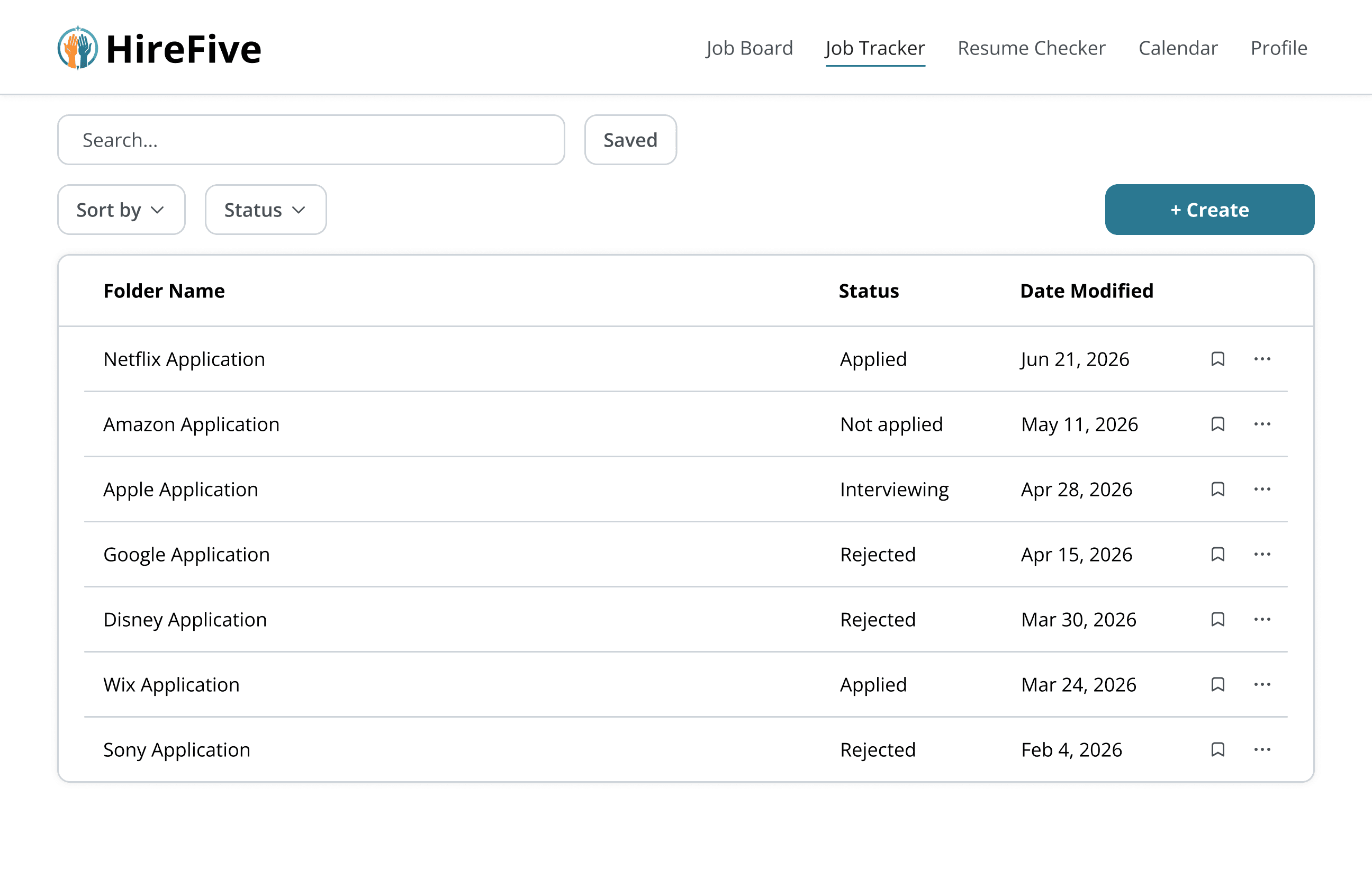
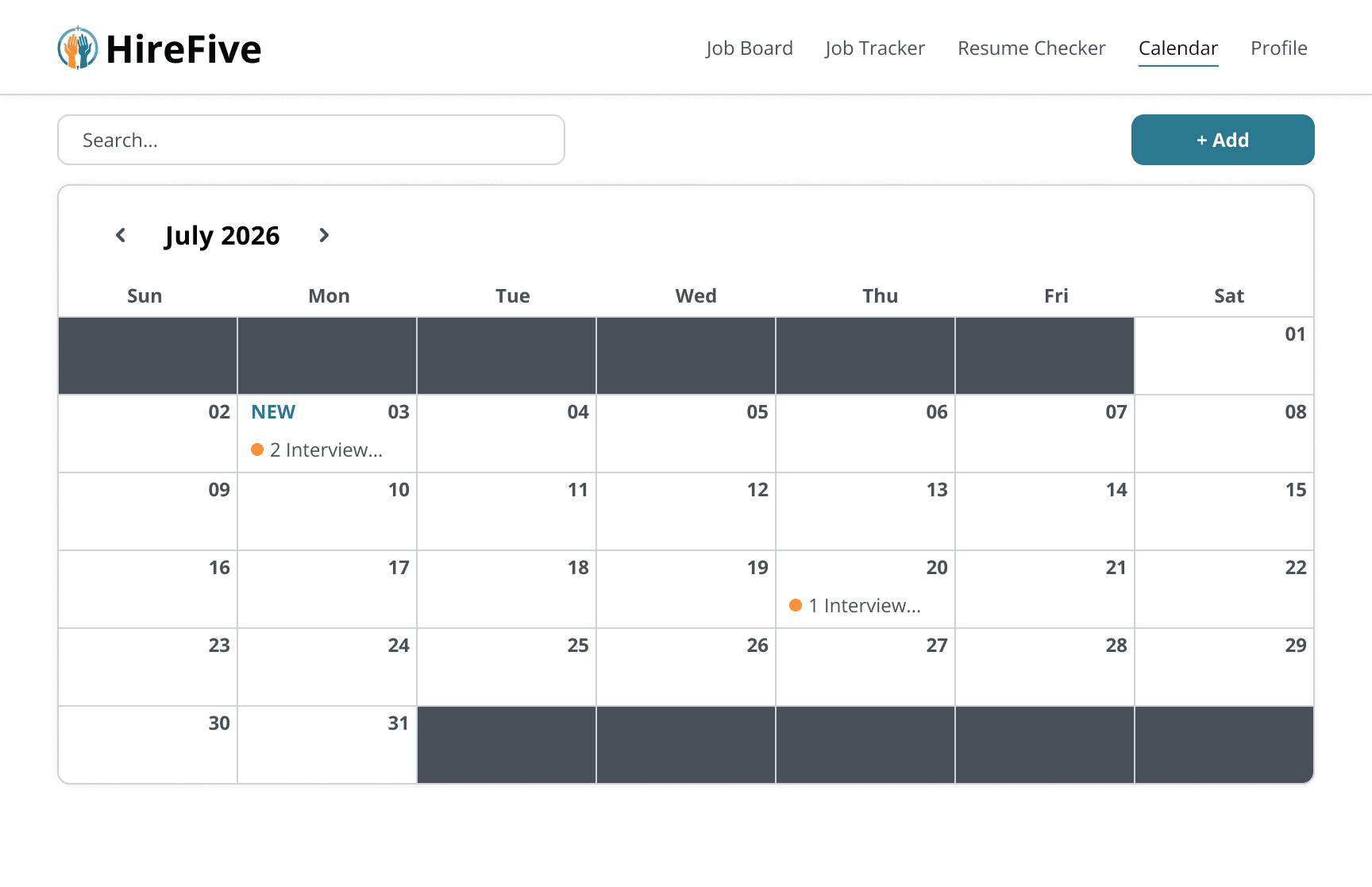
I combined the wireframes and design system into an interactive, high-fidelity prototype that simulates the comprehensive HireFive ecosystem.

To minimize manual user maintenance, I designed cross-system logic where actions in one module automatically update another. For example, updating an application status to "Interview" inside the Job Tracker instantly synchronizes and schedules the event details within the Calendar.

Screenshot of the high-fidelity HireFive Job Board dashboard, displaying active listings like UI/UX Designer at Netflix with complete company logos, filters, and a main panel showing detailed description and an Apply button.
Screenshot of the high-fidelity HireFive Resume Checker panel for a Tesla internship application, showing a green circular graph indicating a seventy-eight percent ATS Score alongside detailed readability and formatting feedback.
Screenshot of the high-fidelity HireFive Job Tracker dashboard, featuring a clean data table populated with specific company applications like Netflix, Amazon, and Apple alongside their current interview statuses and dates.
Screenshot of the high-fidelity HireFive Calendar dashboard for July twenty twenty-six, showcasing a structured scheduling grid populated with colorful tags for tracking interview dates and job events.
Screenshot of the high-fidelity HireFive Job Board dashboard, displaying active listings like UI/UX Designer at Netflix with complete company logos, filters, and a main panel showing detailed description and an Apply button.
Screenshot of the high-fidelity HireFive Job Tracker dashboard, featuring a clean data table populated with specific company applications like Netflix, Amazon, and Apple alongside their current interview statuses and dates.
Screenshot of the high-fidelity HireFive Resume Checker panel for a Tesla internship application, showing a green circular graph indicating a seventy-eight percent ATS Score alongside detailed readability and formatting feedback.
Screenshot of the high-fidelity HireFive Calendar dashboard for July twenty twenty-six, showcasing a structured scheduling grid populated with colorful tags for tracking interview dates and job events.

3. Refine

Usability Testing

To validate the platform's navigation and unified ecosystem, I conducted three rounds of moderated usability testing and discovered two critical issues:

  1. Navigation Friction: Participants spent extra time navigating because primary desktop menu items were completely hidden inside a mobile-style hamburger menu.

  2. Low Visual Affordance: Participants failed to recognize that the "Analysis" and "Recommendations" sections were interactive tab options due to their flat styling.
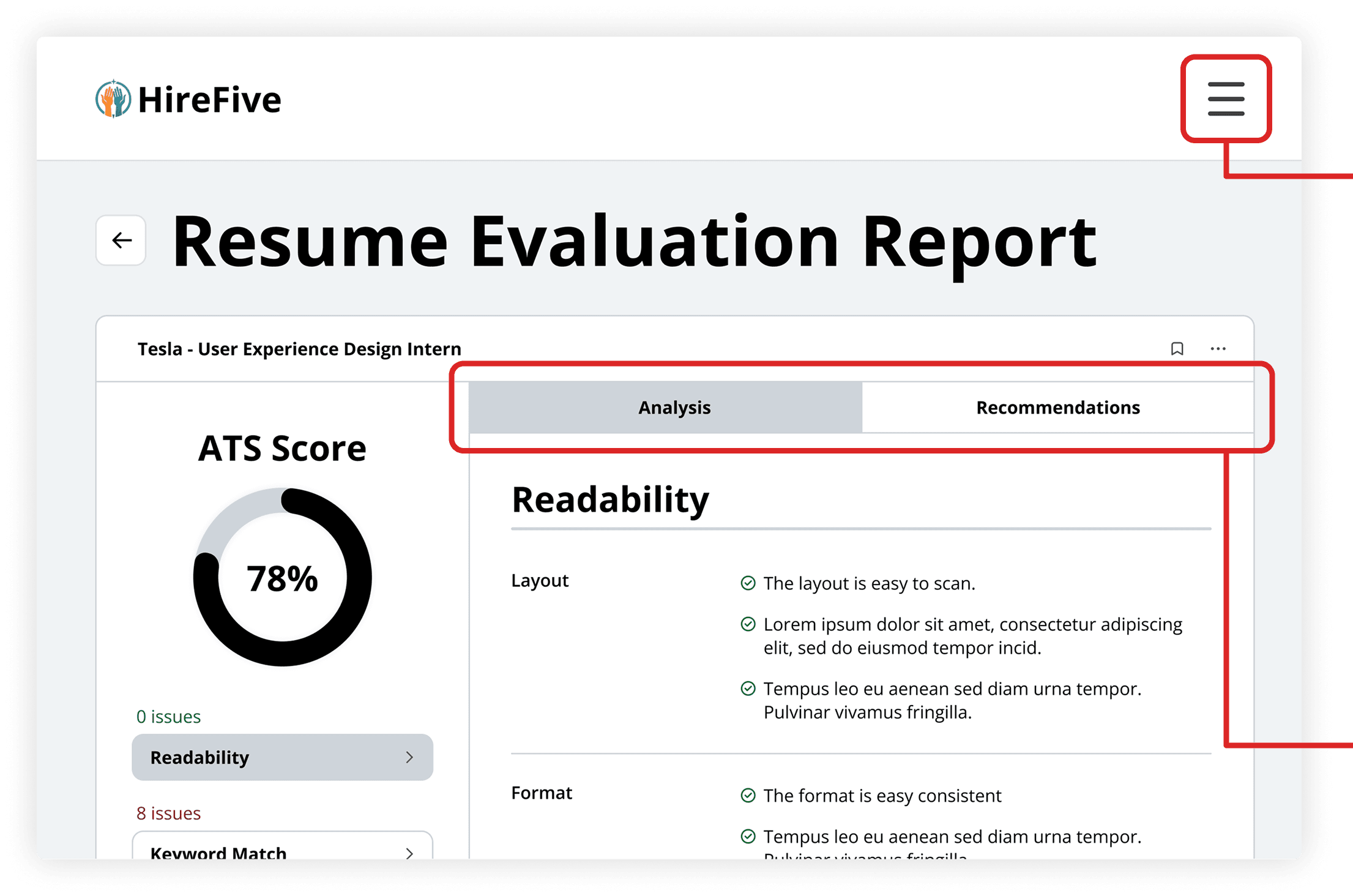
A UI screenshot of the HireFive Resume Checker interface, highlighting the issues of a desktop hamburger menu icon and the flat-styled Analysis and Recommendations tabs.

Issue #1

Hiding primary menu items inside a hamburger menu caused significant navigation delays for participants.

Issue #2

Participants did not realize the two tabs were interactive due to low visual affordance.

Issue #1

Participants had to spend extra time navigating because key menu items were hidden inside the burger menu.

A UI screenshot of the HireFive Resume Checker interface, highlighting the issues of a desktop hamburger menu icon and the flat-styled Analysis and Recommendations tabs.

Issue #2

Participants did not realize that the two tabs were clickable due to low visual affordance.

Issue #1

Participants had to spend extra time navigating because key menu items were hidden inside the burger menu.

Participants had to spend extra time navigating because key menu items were hidden inside the burger menu.

A UI screenshot of the HireFive Resume Checker interface, highlighting the issues of a desktop hamburger menu icon and the flat-styled Analysis and Recommendations tabs.

Issue #2

Participants did not realize that the two tabs were clickable due to low visual affordance.

Issue #1

Participants had to spend extra time navigating because key menu items were hidden inside the burger menu.

A UI screenshot of the HireFive Resume Checker interface, highlighting the issues of a desktop hamburger menu icon and the flat-styled Analysis and Recommendations tabs.

Issue #2

Participants did not realize that the two tabs were clickable due to low visual affordance.

Design Iterations

Integrating both quantitative behavioral metrics and qualitative feedback from usability testing, I executed strategic layout revisions to refine the final desktop scope.

To resolve the core friction points identified by users, I implemented two major iterations:

  1. Persistent Global Navigation: Primary menu links were pulled out of the hamburger menu and placed into a top navigation bar, eliminating secondary clicks and accelerating page-to-page transitions.

  2. Real-world Conventions: The report section was redesigned using block-style tab indicators to mimic a physical binder and give users an immediate visual cue that the components are interactive.

A UI screenshot of the redesigned HireFive Resume Checker interface, highlighting the solutions of a persistent top navigation bar and block-style tab indicators for Analysis and Recommendations.

Solution #1

Primary navigation links were moved to a global top bar to eliminate hidden menus and reduce user transition time.

Solution #2

High-affordance tab layouts were introduced to clearly indicate interactive workspace elements.

Solution #1

The key menu items are pulled out of the burger menu to save users time when switching between primary pages.

A UI screenshot of the redesigned HireFive Resume Checker interface, highlighting the solutions of a persistent top navigation bar and block-style tab indicators for Analysis and Recommendations.

Solution #2

By following real-world conventions, users can quickly know the functionality of the UI Elements.

Solution #1

Solution #1

The key menu items are pulled out of the burger menu to save users time when switching between primary pages.

The key menu items are pulled out of the burger menu to save users time when switching between primary pages.

A UI screenshot of the redesigned HireFive Resume Checker interface, highlighting the solutions of a persistent top navigation bar and block-style tab indicators for Analysis and Recommendations.

Solution #2

Solution #2

By following real-world conventions, users can quickly know the functionality of the UI Elements.

By following real-world conventions, users can quickly know the functionality of the UI Elements.

Solution #1

The key menu items are pulled out of the burger menu to save users time when switching between primary pages.

A UI screenshot of the redesigned HireFive Resume Checker interface, highlighting the solutions of a persistent top navigation bar and block-style tab indicators for Analysis and Recommendations.

Solution #2

By following real-world conventions, users can quickly know the functionality of the UI Elements.

4. Final

Key Features

To streamline users' job search processes, HireFive offers the following four key features:

  1. Auto-Fill Application: By saving users' information and auto-filling job applications, users can save time from manually entering the same data for each application.

  2. Automated Application Folders: By automatically creating a folder and including all documents used for each application, users can effectively manage and access job materials for different applications.

  3. Auto-Synced Calendar: By syncing the Calendar system with application statuses, users can easily track all interview dates.

  4. Resume Optimization: By providing a comprehensive report, users can build a stronger resume tailored to a specific company.

Feature #1

Auto-Fill Application

Feature #2

Automated Application Folder

Feature #3

Auto-Synced Calendar

Feature #4

Resume Optimization

Feature #1

Auto-Fill Application

Feature #1

Auto-Fill Application

Feature #2

Automated Application Folder

Feature #2

Automated Application Folder

Feature #3

Auto-Synced Calendar

Feature #3

Auto-Synced Calendar

Feature #4

Resume Optimization

Feature #4

Resume Optimization

Feature #1

Auto-Fill Application

Feature #1

Auto-Fill Application

Feature #2

Automated Application Folder

Feature #2

Automated Application Folder

Feature #3

Auto-Synced Calendar

Feature #3

Auto-Synced Calendar

Feature #4

Resume Optimization

Feature #4

Resume Optimization

Impact

The final round of usability testing involved five participants, yielding the following three key metrics that validated the overall success and product value of HireFive.

100% Task Completion Rate

All participants seamlessly navigated the unified platform ecosystem and executed critical workflows within 20 minutes.

94% Rating

Participants awarded a 94% average usability score, confirming that the platform successfully streamlines and optimizes their job search processes.

High Feature Clarity

A total of 80% of participants intuitively understood and correctly interacted with complex platform features without hesitation, proving the effectiveness of the high-affordance UI updates.

Next Steps

To continue scaling HireFive and maximizing its market value, the following strategic next steps will guide the platform's product roadmap.

Continuous Iteration

Conduct further usability testing rounds to identify and address potential issues.

Employer Dashboard

Design an Employer Dashboard to let employers post jobs and interact with job seekers directly on the platform.

Feature Expansion

Scale the Resume Checker to allow users to edit their resumes within the platform.

Other Case Study

Other Case Studies

Other Case Studies

Other Case Studies

Contact

victorf588@gmail.com

© 2026 Victor Fang.

Contact

victorf588@gmail.com

© 2026 Victor Fang.

Contact

victorf588@gmail.com

© 2026 Victor Fang.

Contact

victorf588@gmail.com

© 2026 Victor Fang.